
Your mock server,
now an MCP server.
Every Mokkify operation is exposed as an MCP tool over streamable HTTP — built into the app at /mcp, no sidecar to run. Ask Claude, or any MCP client, to create endpoints, build response templates, fire test requests, and read the logs — straight from the conversation.
claude mcp add --transport http mokkify https://your-mokkify/mcp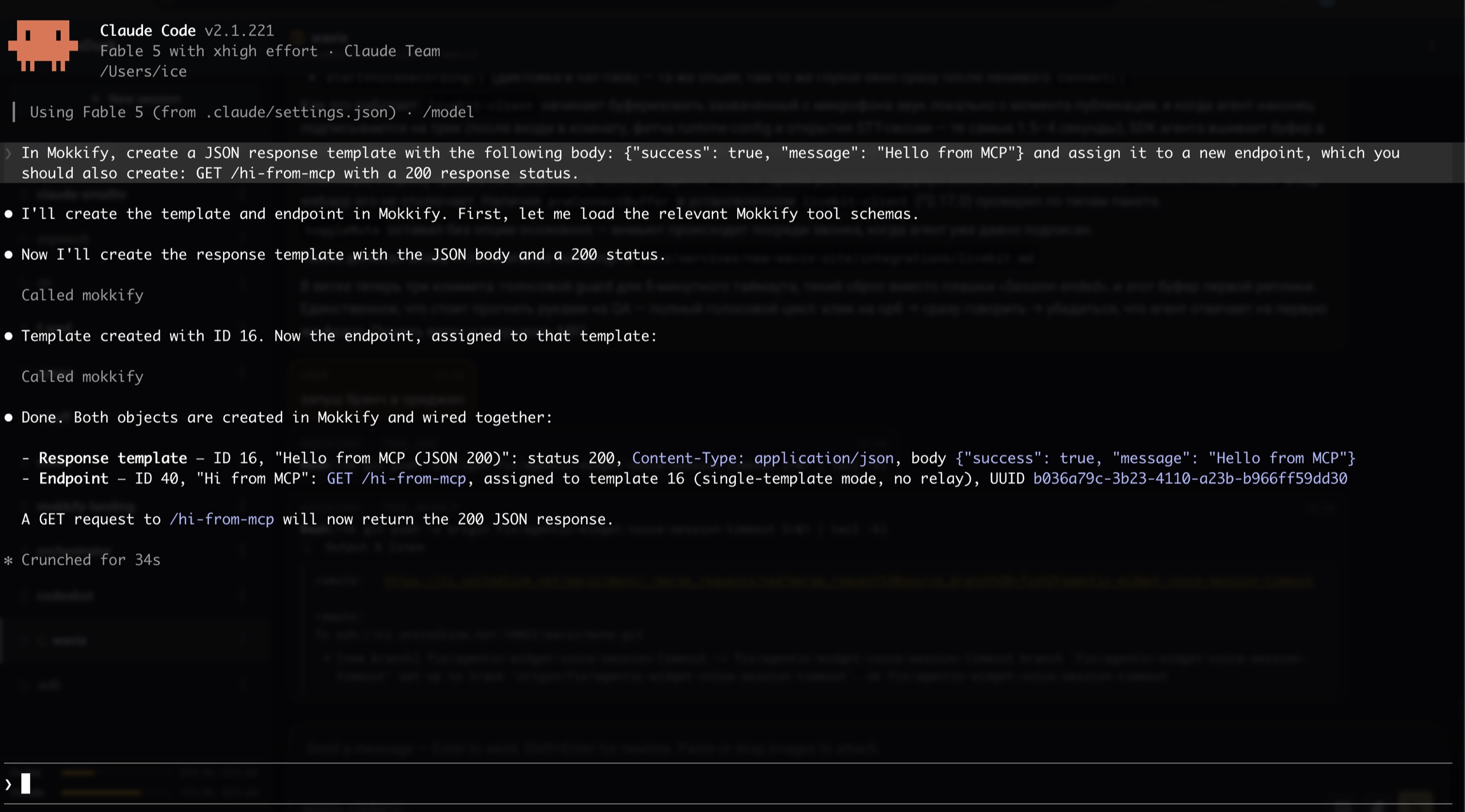
One prompt — “create a JSON response template and wire it to GET /hi-from-mcp” — and the agent creates the template, the endpoint, and reports back with the IDs.
Built in, not bolted on
The MCP server ships inside Mokkify and mirrors its API surface exactly — the same operations the admin UI uses, exposed as tools.
Zero setup
The MCP server is built into the app at /mcp. Stateless, POST-only streamable HTTP — nothing to install, nothing to babysit, and any replica can answer.
Tools from the contract
One tool per backend operation, generated straight from the published OpenAPI 3.1 spec. Ship a new endpoint and it becomes a tool on deploy — no hand-written definitions to drift.
Create, then prove it
createMock builds the response template and its endpoint atomically. verifyMock fires the mock server-side and returns the live response together with the matching log row.
Keys, not passwords
Agents authenticate with long-lived API keys sent as a Bearer header. Minted in the UI, shown once, stored hashed — and revocable in one click.
Client without HTTP transport? A standalone stdio server ships in mcp/ — same tools, same contract.
Connected in a minute
Create a key, copy the config the UI hands you, paste it into your client. That is the whole setup.
Create an API key
<key_id>.<secret> — only a hash is stored, so copy it right away.Copy the ready config
Paste into your client
$ claude mcp add --transport http \
  mokkify https://your-mokkify/mcp \
  --header "Authorization: Bearer <key>"
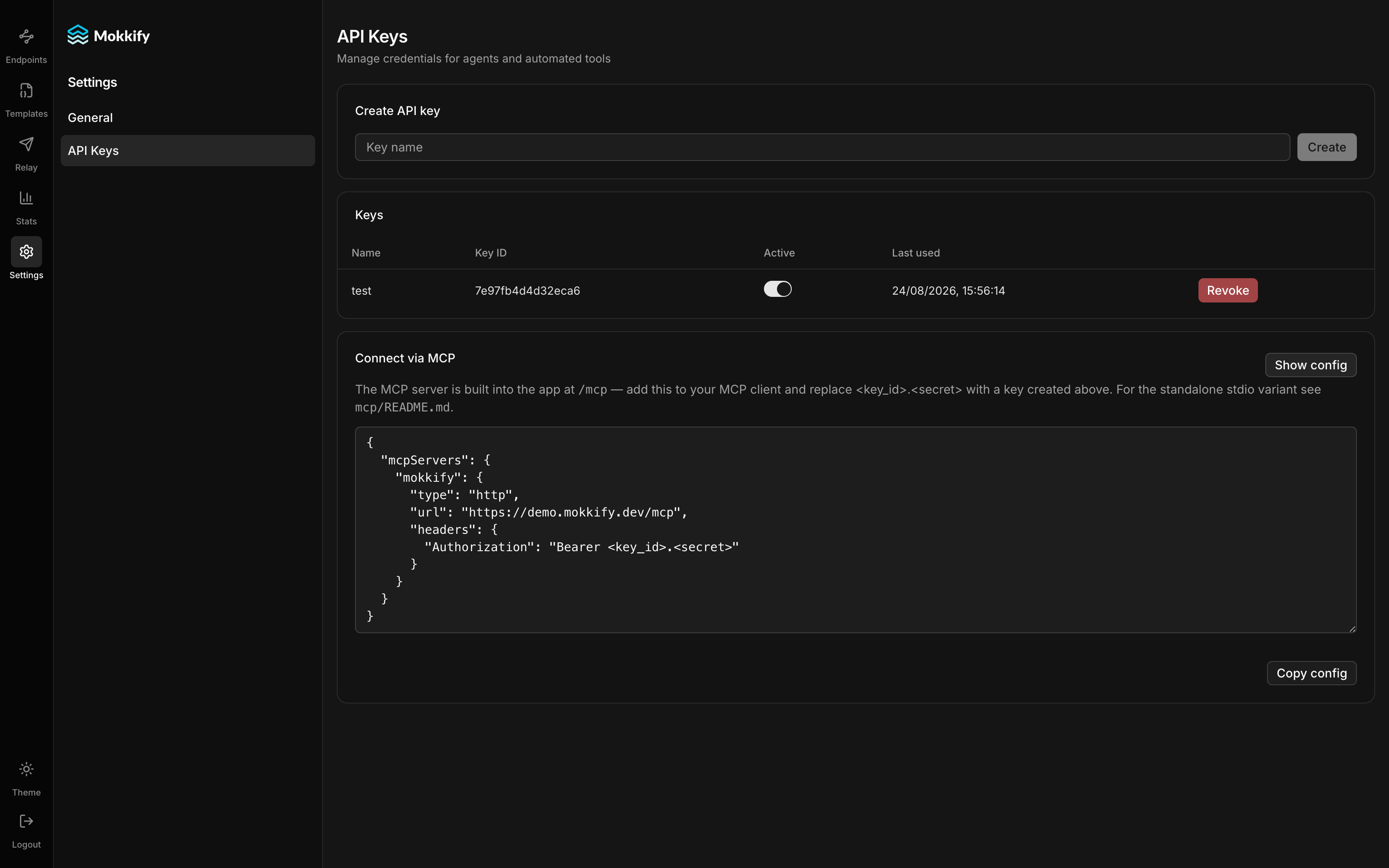
Keys and the ready-made MCP config live side by side — no docs to dig through.
Using a JSON-configured client instead? Same thing:
{
  "mcpServers": {
    "mokkify": {
      "type": "http",
      "url": "https://your-mokkify/mcp",
      "headers": {
        "Authorization": "Bearer <key_id>.<secret>"
      }
    }
  }
}
What do you ask it?
Anything you would otherwise click through the UI — and things you would not attempt by hand.
“Scan this project for outbound HTTP integrations. For each one, use the mokkify MCP to create a mock with a realistic response, repoint the integration's base URL at Mokkify, and run the integration tests.”
The agent discovers the calls and repoints your config; the MCP handles the Mokkify side — one namespaced mock per integration, each verified with a real request and its log row.
Point your agent at Mokkify
Spin up the live demo, mint an API key in Settings → API Keys, and let the agent build the mocks. MIT-licensed, self-hosted, yours.